Rules and ethics
Making Tax Digital and productivity software: what UK records must show
Productivity software must keep HMRC digital records for Making Tax Digital VAT and Income Tax, with clear audit trails and compatible software.
What to take away
- Productivity software must keep HMRC digital records for Making Tax Digital VAT and Income Tax.
- VAT filing needs a clear audit trail from invoice to return, with compatible software.
- The Value Added Tax Act 1994 and Companies Act 2006 set the underlying record-keeping duties.
- MTD for Income Tax starts for sole traders and landlords above the turnover threshold.
- Software should preserve original invoices, VAT rates, adjustments and submission logs.
What Making Tax Digital requires of digital records
Making Tax Digital (MTD) changes how VAT-registered businesses keep records. HMRC requires digital records, not paper or spreadsheets alone. The rules are set out in Charge, reclaim and record VAT: Charging VAT - GOV.UK.
You must keep records of sales and purchases digitally. That includes invoices, credit notes, and the VAT on each transaction. You also need to record how you worked out the VAT.
Digital records must be kept in compatible software. HMRC does not accept manual transfers of totals from spreadsheets into the VAT return. The software must send the return directly.
If you use spreadsheets, they must be bridging software that links to HMRC. The digital record is the source, not the spreadsheet summary.
MTD for VAT applies to all VAT-registered businesses, including those below the threshold that volunteer. It is not optional for the digitally excluded without an exemption.
VAT filing, audit trails and compatible software under MTD
VAT filing under MTD means submitting returns through compatible software. The software must be recognised by HMRC. You can check the list on GOV.UK.
Invoice to VAT return audit trail
- Invoice: £1,200 plus VAT
- Apply 20% VAT: £240
- Post £240 to VAT account
- Credit note reverses VAT
- Final return figure
An audit trail shows how each figure in the return was built. It links the invoice, the VAT rate, the adjustment, and the return line. Without it, HMRC cannot verify the return.
Compatible software must keep the audit trail intact. It should not allow you to overwrite a posted invoice without leaving a trace. Corrections must be logged.
A worked example: a business sells standard-rated goods for £1,200 plus VAT. The software records the invoice, applies 20% VAT, and posts £240 to the VAT account. If the customer returns the goods, the credit note reverses the VAT. The audit trail shows both entries and the final return figure.
Under MTD, you cannot simply type the total VAT into a spreadsheet and file. The digital link must connect the records to the return. That is the compatible software requirement.
For teams running productivity software operations, the audit trail is part of the service. It must survive upgrades and data migrations.
Records productivity software must retain for HMRC
HMRC expects records that show the tax position clearly. For VAT, that includes sales invoices, purchase invoices, credit notes, debit notes, and VAT account entries.
You must retain records of zero-rated, exempt, and outside-scope sales. The software should flag these so they are not included in the VAT return by mistake.
Keep the submission logs. These show when a return was sent, what was sent, and the HMRC receipt.
If you use an accountant, they need access to the same digital records. The software should support user roles and an activity log.
The table below sets out the retention periods.
| Record | How long to keep it |
|---|---|
| VAT records, including invoices, credit notes and the VAT account | Six years from the end of the accounting period |
| Submission logs and HMRC receipts | Six years from the end of the accounting period |
| Accounting records for a limited company | Six years from the end of the financial year |
| Records for assets | Longer than six years in some cases |
Check HMRC guidance for your case.
A quality checklist for records should cover these fields for every transaction:
- The date of the transaction.
- The parties involved.
- The VAT registration numbers of suppliers and customers, where required.
- The VAT rate applied.
- The net amount and the VAT amount.
- Any adjustment, such as a credit note or debit note.
Making Tax Digital for Income Tax for sole traders and landlords
MTD for Income Tax extends digital record-keeping to sole traders and landlords. It applies from April 2026 for those with qualifying income above £50,000. The threshold drops to £30,000 from April 2027.
You must keep digital records of income and expenses. That includes invoices, receipts, and summaries. You must use compatible software to send updates to HMRC.
Quarterly updates are required, plus a final declaration. The quarterly update deadlines are 7 August, 7 November, 7 February and 7 May. The final declaration is due by 31 January after the end of the tax year. The steps are set out in Making Tax Digital for Income Tax for sole traders and landlords: step by step - GOV.UK.
MTD Income Tax quarterly steps
- Choose compatible software and authorise HMRC
- Record income and expenses digitally
- Send quarterly updates through software
- Review and adjust before final declaration
- Submit final declaration by deadline
If you have multiple income streams, the software must keep them separate but report them together. Landlords with property income and trading income need clear categories.
MTD for Income Tax does not replace the need for VAT records if you are VAT-registered. You may need to run both sets of rules.
Invoices, VAT rates and the Value Added Tax Act 1994
The Value Added Tax Act 1994 is the primary legislation for VAT. It sets out the requirement to keep records and to provide invoices. You can read it at Value Added Tax Act 1994.
Under the Act, a VAT invoice must show specific details. These include the supplier's name, address, and VAT number. It must also show the invoice date, a unique number, and the tax rate.
For each line, show the net amount, the VAT rate, and the VAT amount. If you issue a simplified invoice, the rules differ for totals under £250.
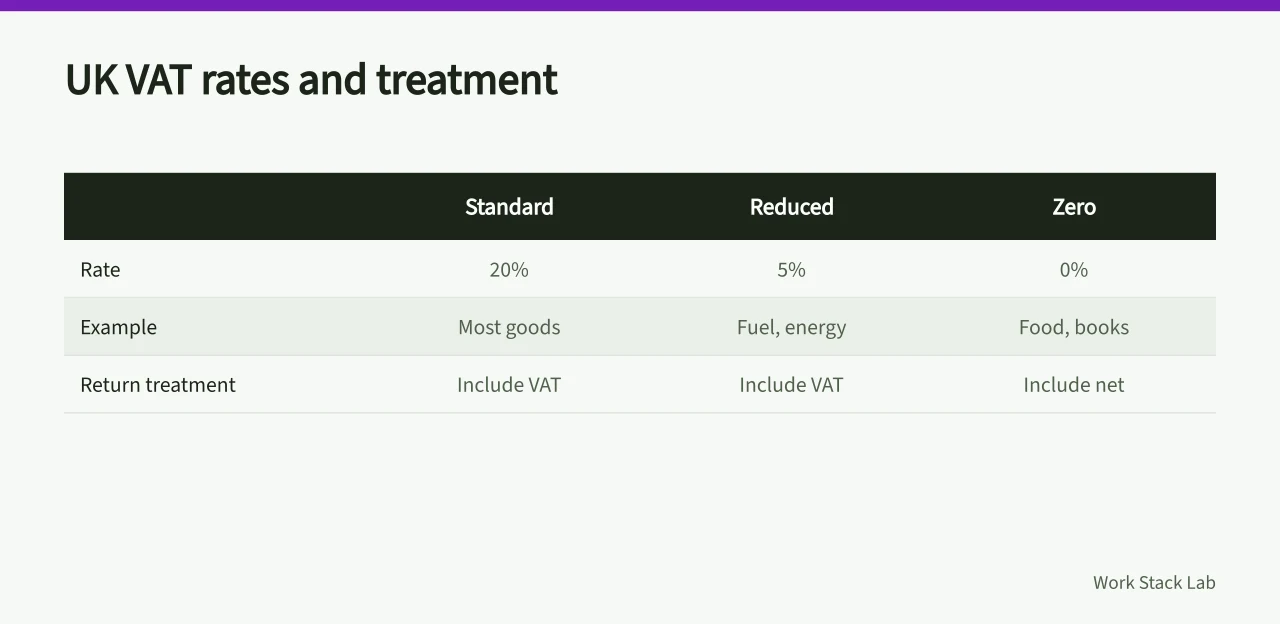
If you use the flat rate scheme or cash accounting, the software must support those methods. The audit trail must show the scheme rules applied.
Errors on invoices must be corrected with a credit note. Do not overwrite the original. The Act and HMRC guidance require a clear trail.
Companies Act 2006 and Companies House record-keeping duties
The Companies Act 2006 sets out record-keeping duties for limited companies. It requires companies to keep accounting records that show and explain their transactions. See Companies Act 2006.
Records must be sufficient to show the company's financial position at any time. They must also enable the directors to ensure that accounts comply with the Act.
Companies must file accounts with Companies House. The filing duties include annual accounts and a confirmation statement. The records behind those filings must be kept for six years from the end of the financial year.
If a company is VAT-registered, it must also keep VAT records. The two sets of rules overlap but are not identical. Productivity software should support both.
Directors are responsible for the records. If they are kept in software, the software must be reliable and the data accessible. A software budget template can help plan for the cost of compliant tools.
Choosing software that produces an HMRC-ready audit trail
HMRC recognises software that can send returns and keep digital records. You can find the list on the HM Revenue & Customs - GOV.UK site.
Providers named on that list include Xero, QuickBooks from Intuit, Sage and FreeAgent. HMRC publishes a separate list for each MTD service, so check the one you file under.
When choosing, check the software against the checklist below.
HMRC-ready software checklist
- Keeps digital records as required by MTD
- Produces and sends VAT return to HMRC
- Maintains audit trail from invoice to return
- Supports VAT rates and schemes you use
- Allows corrections without deleting original entry
- Exports records in a readable format
- Meets retention and access needs
Also consider how the software handles UK rules for business productivity software, including data protection. HMRC does not approve software for all aspects, so you must still check it fits your business.
Test the audit trail before you rely on it. Run a sample transaction through the system and check the report. If it does not show the full path, the software is not suitable.