Costs and pricing
Part of Budgeting for productivity software means pricing the end at the beginning
A software budget template with units, tax, timing and an assumption sheet
Build a transparent software budget with units, quantities, tax, timing, evidence, owners and uncertainty across setup, operation, renewal and exit.
A business productivity software budget template should expose its assumptions before it adds them. Use one row for each charge or staff activity, and never type a total where the unit or quantity is unknown.
This structure is for planning in an England-based organisation. It supplies fields and formulas without invented amounts. A qualified accountant or tax adviser must confirm VAT, foreign currency, capital or revenue classification and reporting treatment.
What to take away
- Build cost rows from documented units and quantities rather than typing totals whose basis is unknown.
- Link every cost row to a named assumption with a source, owner and review date.
- Separate benefits and risk allowances so an assumed saving never reduces a cost line early.
- Version the baseline at approval so later revisions do not erase what decision makers saw.
Header block
At the top, record the option name, service plan, quote date, contract start, comparison horizon, reporting currency and budget owner. Add a single convention for displayed values: net of VAT, gross of VAT, or both in separate columns.
HMRC gives a 20% standard VAT rate for most UK goods and services. That fact does not decide the treatment of a specific software supply or what the buyer can recover. Keep the supplier's VAT amount and finance-approved recovery assumption visible rather than cancelling them automatically.
Cost ledger
Create these columns:
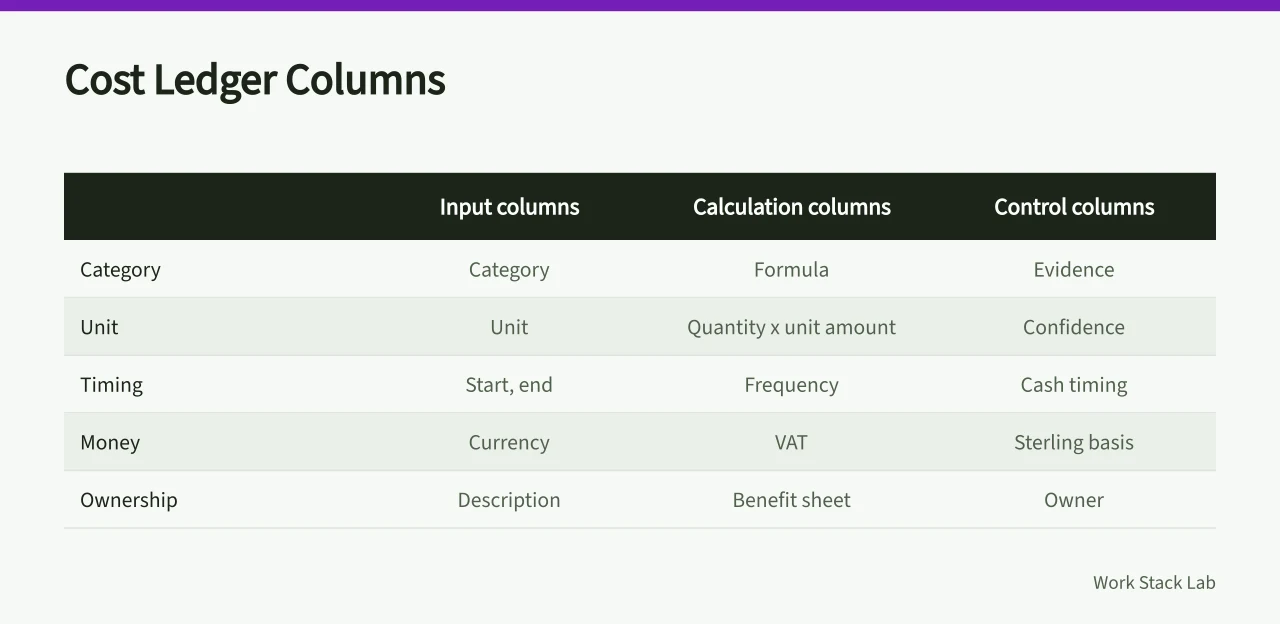
category | description | unit | quantity | unit amount | frequency | start | end | VAT | currency | sterling basis | cash timing | evidence | confidence | owner
Use formulas based on the documented units. For a seat charge, the line logic is billable seats multiplied by price per seat for the relevant periods. For internal work, use approved loaded hourly cost multiplied by planned hours. The spreadsheet should preserve the inputs, not merely the result.
Illustrative worked row (figures for arithmetic only, not a market rate):
| category | description | unit | quantity | unit amount | frequency | start | end | VAT | currency | sterling basis | cash timing | evidence | confidence | owner |
|---|---|---|---|---|---|---|---|---|---|---|---|---|---|---|
| Subscription | Productivity suite seats | seat | 25 | £20 per seat per month (illustrative) | monthly | month 1 | month 12 | 20% standard | GBP | net plus VAT | monthly in advance | supplier quote reference | medium | budget owner |
The illustrative arithmetic is 25 seats multiplied by £20 = £500 net per month. VAT at 20% adds £100, giving £600 gross. If finance approves full recovery, show £500 net and £100 recoverable. If not, show £600 gross. Record the decision, date and owner on the row.
The article does not supply a downloadable file. To recreate the template, open a blank spreadsheet and copy the column headers into row 1. Add tabs named Assumptions, Risks, Monthly output and Reconciliation. Keep formulas in the cost ledger instead of hard-coded totals.
Group rows under discovery, subscription, implementation, integration, migration, training, administration, security, support, renewal and exit. Add a separate benefit sheet so an assumed saving never reduces a cost line before it has been observed.
Tax and accounting review
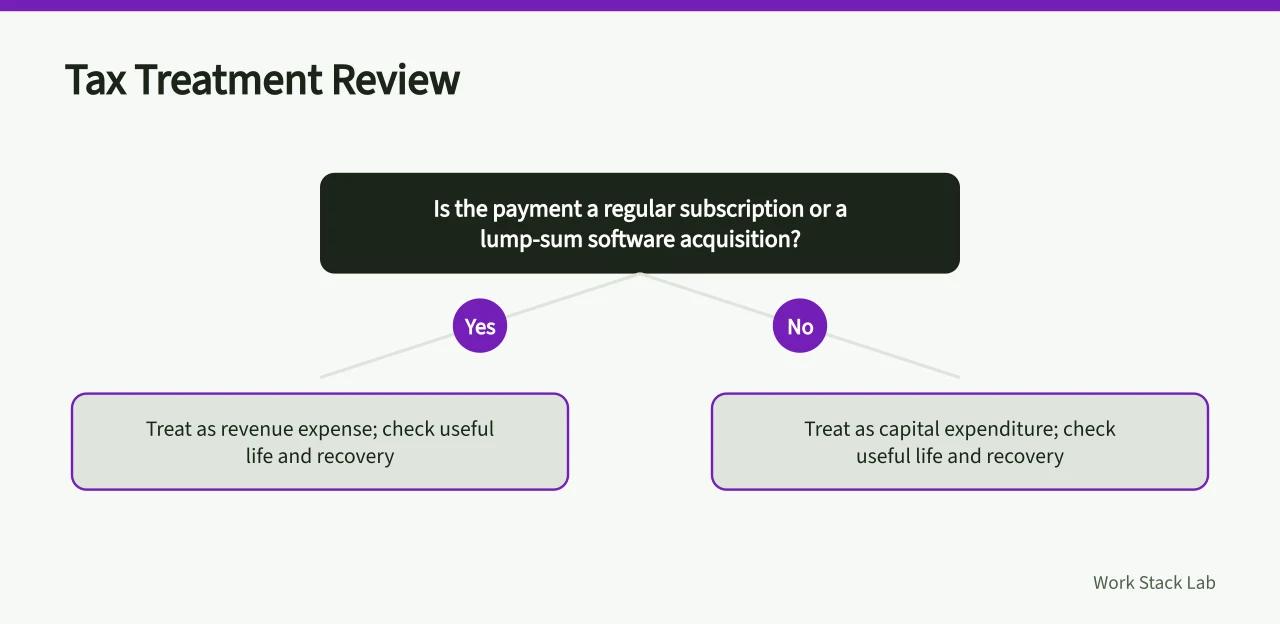
Provide the reviewer with contracts, invoices and work descriptions. HMRC's IT costs toolkit distinguishes regular payments from lump-sum software acquisitions and asks about useful life. It identifies tax-risk questions, not the answer for a given business. The toolkit is free to view on GOV.UK using the link above.
If invoices use another currency, enter the original amount, applicable rate, date and source. HMRC's foreign-exchange manual points to the accounting standards used for business transactions. Finance should choose the method and apply it consistently. The manual is free to view on GOV.UK using the link above.
Assumption and risk sheets
Give every assumption an identifier, statement, source, owner, checked date and next review. Link the cost row to that identifier. For uncertain seats, usage or staff time, create lower, base and upper quantities without changing unrelated inputs.
Assumptions vs Risk Register
Assumption sheet
- Identifier
- assumption ID
- Statement
- assumption text
- Source
- source
- Owner
- owner
- Review
- checked date, next review
Risk register
- Identifier
- risk ID
- Statement
- event and effect
- Source
- trigger
- Owner
- cost owner
- Review
- mitigation
Maintain a risk register beside contingency. Describe the event, effect, mitigation, trigger and cost owner. This stops the same risk being included as a line estimate, a risk allowance and an unexplained percentage.
Monthly output
Summarise cash by month and category, then show total ownership cost over the agreed horizon. Keep non-cash opportunity cost in its own column. Add unresolved items, notice deadlines and renewal decisions below the chart.
Protect the workbook's decision trail. Lock formula cells, give input cells a consistent visual treatment and record who changed a material assumption. Place the supplier quotation and approval note in the same controlled location rather than pasting figures without provenance.
Create a reconciliation tab with budget, committed, invoiced, paid and forecast-at-completion columns. Finance can then identify whether a variance comes from quantity, unit rate, timing, tax or scope. Do not report a favourable variance when an invoice has merely moved into the next period.
After approval, replace forecasts with invoices and actual hours while retaining the original values. Variance becomes useful evidence for renewal. The template is ready only when another reader can trace every material total back to a dated record and named owner.
Before you act
- Record option name, plan, quote date, contract start and budget owner.
- Choose one displayed value conventionnet, gross or both.
- Group cost rows under discovery, subscription, implementation and exit.
- Give each assumption an identifier, source, owner and review date.
- Lock formula cells and mark input cells consistently.
- Add a reconciliation tab covering budget, committed, invoiced and paid.
Common questions
How should a software budget template treat VAT?
Use the tax and accounting review above. Record the evidence and the finance decision on the cost row.
How does the template handle uncertain quantities such as seats or staff time?
Use the assumption sheet to hold each uncertain quantity. Give it an identifier, source, owner and review date, then link the cost row to that identifier. This preserves the inputs instead of only the result.